Little Window
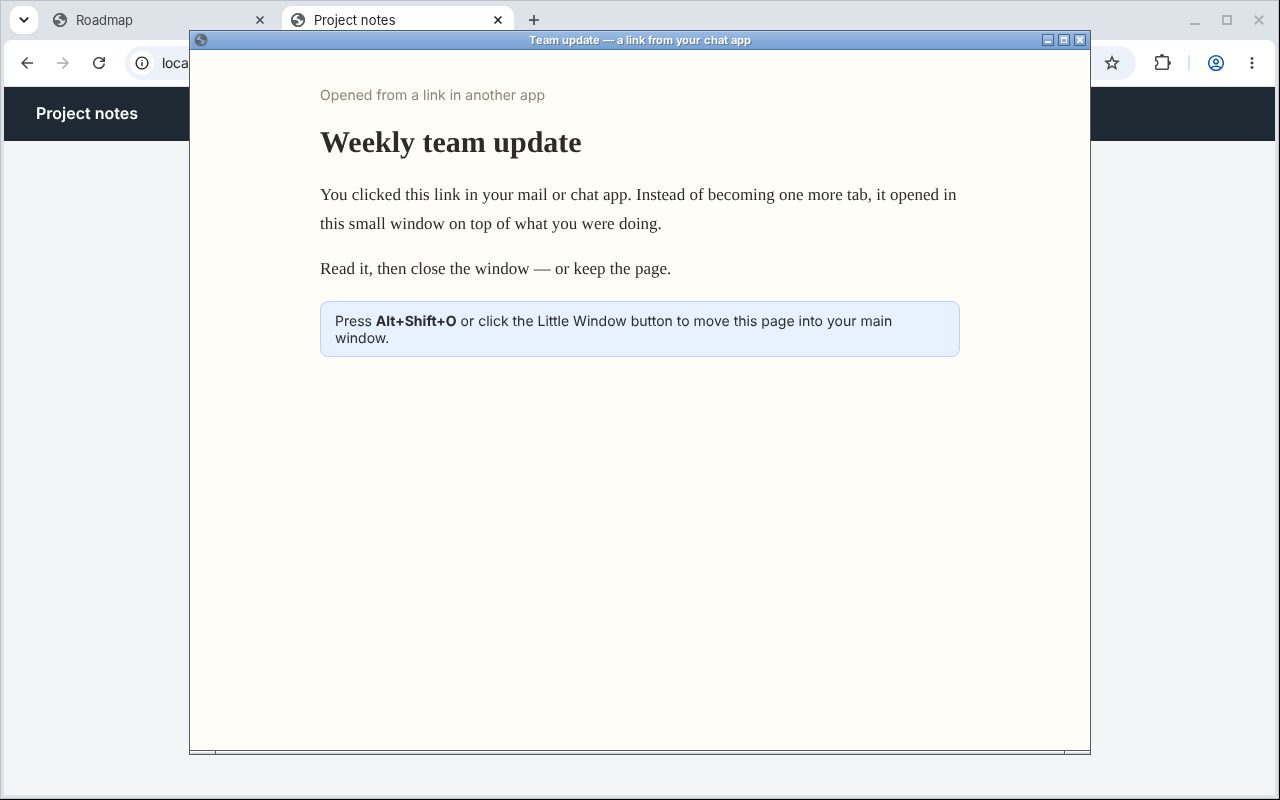
Links you click in other apps open in a small window instead of one more tab. A Chrome extension for people who miss Little Arc.
Not available yet. Version 0.1.0 is built and tested on Linux and is being prepared for Chrome Web Store review. This page will link to the store once it is published.
What it does
- Small window for outside links — a link from your mail, chat, notes or terminal opens in a small window on top of what you were doing. Your tabs stay as they are.
- Close it or keep it — close the window when you are done, or press Alt+Shift+O (or click the Little Window button) to move the page into your main window as a normal tab.
- Two settings — the size of the small window, and an on/off switch.
How to use it
- Install the extension and keep Chrome as your default browser.
- Click a link in another app. It opens in a small window.
- To keep the page, press Alt+Shift+O or click the Little Window button in the toolbar. You can change the shortcut at
chrome://extensions/shortcuts. - Open the extension's Options to change the window size or turn the behavior off.
FAQ & troubleshooting
- Why does Chrome say it can “Read your browsing history”?
- To tell a link from another app apart from a link clicked inside Chrome, Little Window listens for the moment a page starts loading. Chrome labels that permission this way. Nothing is saved or sent. Details: privacy policy.
- A link opened as a normal tab.
- This is expected when Chrome itself was just starting, or when the Chrome window had no other tabs. If it happens at other times, please report it with your operating system and Chrome version.
- Links inside Chrome are not opened in a small window.
- Correct. Little Window only handles links that come from other apps.
- Which systems are supported?
- Version 0.1.0 has been tested automatically on Linux. macOS and Windows are being checked before release.
- Is it free?
- Yes. No in-app purchases.
Little Window is an independent project by tanemaki and is not affiliated with The Browser Company or Arc.
Changelog
- 0.1.0 — first version (not yet published).
Support
- Bug reports and ideas: GitHub Issues
- Email: bysk.333@gmail.com
Last updated: November 11, 2026